When an agency sends a client a 50-page raw automated scan export full of cryptic CSS selectors and WCAG criteria numbers, the client usually reacts in one of two ways: panic or paralysis.
An effective website accessibility report template bridges the gap between client stakeholders who care about business risk and developers who need exact code fixes.
Whether you are delivering a standalone audit or presenting a scope of work for a redesign retainer, structuring your audit document cleanly ensures fixes get approved quickly.
What an Agency Accessibility Report Should Contain
To serve as both a commercial proposal and a developer blueprint, an agency report must split its findings into two core layers:
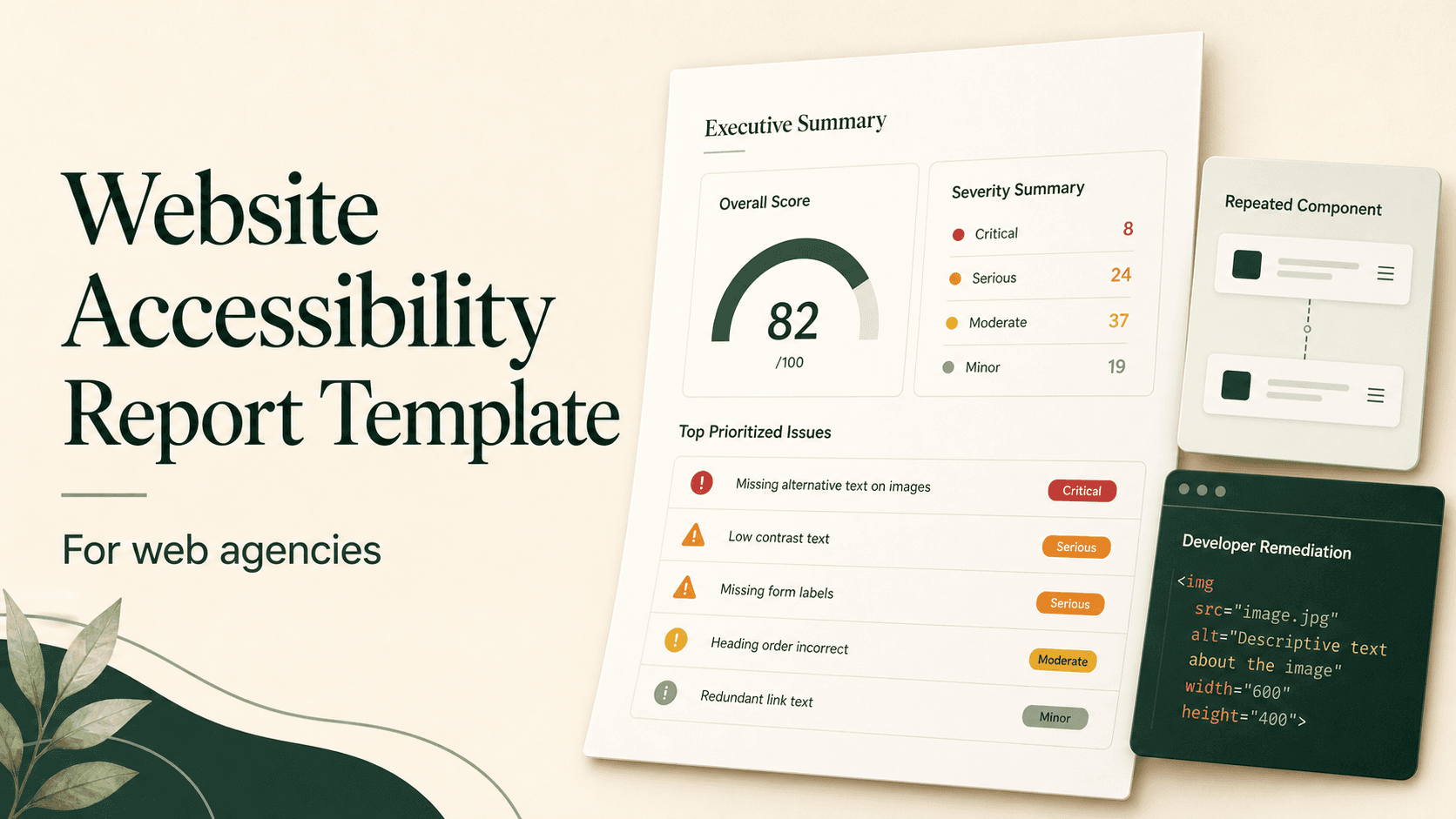
- The Executive Layer: High-level accessibility scores, business risks, priority issue counts, and estimated remediation timelines for managers and non-technical stakeholders.
- The Technical Layer: Precise HTML/CSS selectors, WCAG success criteria tags, code examples, and step-by-step remediation instructions for frontend developers.
Automating the generation of these dual-layer reports using white label accessibility reports allows agencies to present audit results under their own client-service branding without spending hours formatting raw scan data.
Structuring the Executive Summary
The executive summary is the only section most client decision-makers will read in full. Keep it focused on high-level impact rather than deep technical mechanics.
1. Current State (Score & Audit Scope) → 2. Key Business Risks (Form Blockers / Navigation Barriers) → 3. Remediation Roadmap (Estimated Hours & Phases)
Always state the scope clearly upfront (e.g., "12 primary page templates scanned on live domain including checkout workflows") so clients understand exactly what was tested.
Overall Score, Issue Totals, and Severity Prioritization
Raw issue counts can be misleading. A site with 200 minor color contrast warnings in a footer is often more usable than a site with 1 critical focus trap that stops keyboard users from completing a purchase.
Structure your report findings using a strict 4-tier severity matrix:
<h1> to <h4>) or missing landmarks.Handling Repeated Component Issues
One common mistake in agency reports is inflating issue counts by listing the same header, navigation menu, or footer error on every single page.
If a navigation dropdown lacks keyboard access across a 500-page site, list it once in your report as a Global Component Issue. Explaining that fixing one component template resolves 450 recorded instances demonstrates efficiency and keeps remediation estimates realistic.
Developer Remediation Details
Once executives approve the audit, your technical team needs actionable instructions. Each identified issue in the technical appendix must include:
<button class="submit-btn" onclick="sendForm()"><i class="icon-check"></i></button><button class="submit-btn" onclick="sendForm()" aria-label="Submit Contact Form"><i class="icon-check" aria-hidden="true"></i></button>- WCAG Criterion: e.g., WCAG 2.2 Success Criterion 4.1.2 (Name, Role, Value).
- CSS Selector: e.g.,
form#contact > button.submit-btn. - Impact Explanation: Screen reader speaks "Button" with no purpose.
- Actionable Fix: Add explicit
aria-labelor visible button text.
Automated vs. Manual Testing Disclosure
Clear scope disclosures set accurate client expectations. Every report template should explain what automated checkers can and cannot detect.
Automated Testing Scope & Limitations
"This audit used automated scanning tools combined with sampled manual checks. Automated tools evaluate only a portion of accessibility requirements. This report is not legal certification and does not establish complete WCAG conformance. A fuller evaluation also requires manual keyboard, screen-reader, and user-journey testing."
Recommended Next Steps and Rescanning Schedule
Conclude your report with a concrete action plan rather than an open-ended problem list. Outline clear implementation phases:
- Phase 1 (Immediate - Week 1): Fix Critical blockers (forms, main navigation, focus traps).
- Phase 2 (Short Term - Weeks 2–3): Resolve Serious contrast and label issues across core templates.
- Phase 3 (Ongoing - Monthly): Schedule automated rescans to catch content drift and template regressions.
Pairing initial audits with a recurring rescan schedule allows agencies to sell continuous maintenance retainers. See our Website Accessibility Audit Checklist for advice on establishing audit workflows.
A Sample Report Structure Agencies Can Copy
Use this markdown outline as the starting structure for your agency's client audit deliverables:
Agency Accessibility Audit Template Outline
- 1. Document Overview & Scope
- Client Name, Website URL, Audit Date, Audited Scope (Page URLs).
- 2. Executive Summary
- Overall Score (/100), Risk Level (High/Med/Low), Total Issues Breakdown.
- 3. Severity & Issue Breakdown
- Critical, Serious, Moderate, and Minor Issue Counts.
- Global Component vs Single Page Violations.
- 4. Priority Action Items (By Template)
- Homepage, Product Pages, Checkout/Forms, Global Header/Footer.
- 5. Developer Remediation Logs
- WCAG Rule, Element CSS Selector, Current Code vs Remediated Code.
- 6. Methodology & Scope Limitations
- Automated Scanner Engine, Manual Verification Disclosure, Non-Legal Statement.
- 7. Next Steps & Continuous Monitoring Schedule
- Remediation Roadmap, Retainer Rescan Proposal.
Automate client report generation
Generate Client-Ready Reports with CompliantScan
Run automated WCAG 2.2 audits and export polished executive summaries and developer guidance instantly.